How It Works
The mental model behind Hogsend — events in, journeys and emails out, engagement back — and how the scaffold maps that model to the files you edit, so every recipe clicks into place.
Hogsend in one mental model
Hogsend is the lifecycle layer between the events your users generate and the email you send. Email goes out through a swappable provider — Resend by default. Hold three ideas and everything else follows:
- Events flow in. A PostHog webhook, a call from your own app via
@hogsend/client/POST /v1/events, or anydefineWebhookSource()— they all normalize to one kind of thing: an event for a user, throughingestEvent(). - Your code reacts. Journeys send lifecycle email, buckets group users in real time, lists hold preference categories, campaigns broadcast to an audience — all written as TypeScript, not drawn on a canvas.
- Engagement flows back. Opens, clicks, sends, journey completions, and bucket transitions fan back out to PostHog (and Segment, Slack, your warehouse, a CRM) via code-defined destinations, so email lives in the same analytics as everything else.
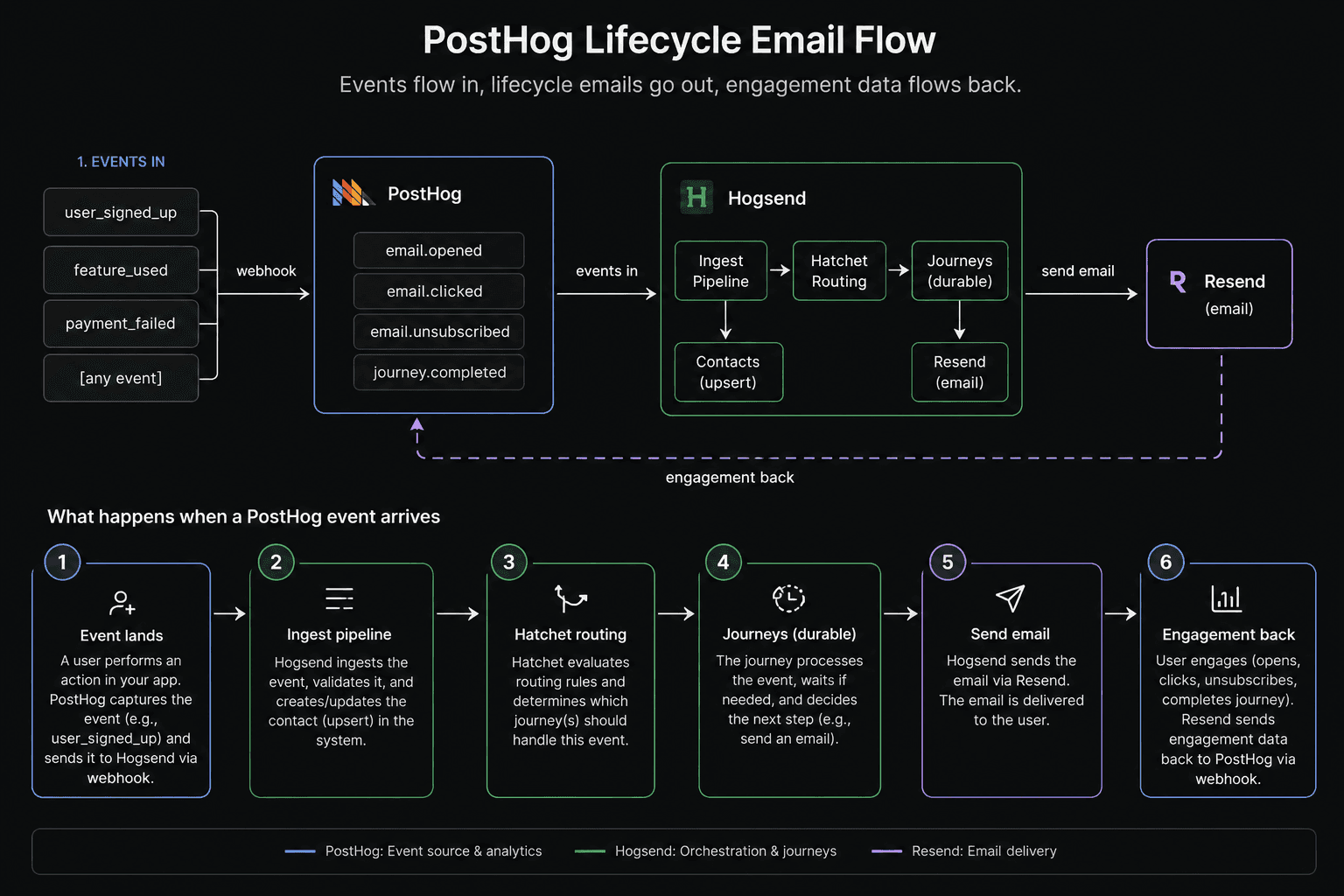
That's the loop. The rest of this page is the toolkit that lives inside it, and how the scaffold hands it to you.
Your toolkit: a handful of primitives
Everything in the recipe book is a combination of a few code-first primitives. Learn these once and a recipe becomes "which of these, in what order":
| Primitive | What it does | Where it lives | Guide |
|---|---|---|---|
| Events | the universal trigger — everything starts here | ingested (no file) | Events |
| Journeys | defineJourney() — durable TypeScript that reacts to an event: send, wait, branch | src/journeys/ | Journeys |
| Emails | React Email templates + sendEmail() — what journeys send | src/emails/ | |
| Buckets | defineBucket() — real-time segments that update as events arrive | src/buckets/ | Buckets |
| Lists | defineList() — subscription categories for the preference center | src/lists/ | Email Lists |
| Destinations | defineDestination() — fan the event stream out to PostHog/Segment/Slack | src/destinations/ | Destinations |
| Webhook sources | defineWebhookSource() — turn any provider's webhook into an event | src/webhook-sources/ | Webhook Sources |
And from your own app code, the @hogsend/client SDK pushes events, upserts contacts, and sends transactional email over the data plane.
Engine vs. content — why it's all yours
Hogsend ships as a framework you install, not a repo you fork:
- The engine —
@hogsend/engine(plus the other@hogsend/*packages) owns the ingestion pipeline, the durable journey runtime, email delivery + tracking, the HTTP API, and the worker loop. You upgrade it withpnpm up; you never edit it. - Your content — the primitives in the table above. They live in your repo and you inject them into the engine. The engine never imports your content.
The folders in that table are your content: you write the primitives, collect each kind into an array, and hand them to the engine's factories. That boundary is what makes upgrades a pnpm up instead of a git merge — see Philosophy and Upgrading & Customizing.
The scaffolding experience
One command gives you the whole thing — a thin app pinned to the engine, every primitive folder stubbed with a working example, and a local stack:
pnpm dlx create-hogsend@latest my-app   # scaffold + install + local setup, one run
cd my-app
pnpm hogsend dev                        # API + worker + Studio on :3002, one terminal
The scaffolder's setup step (the same script as pnpm bootstrap — idempotent, safe to re-run) needs no credentials for local dev: it starts TimescaleDB + Redis + Hatchet-Lite, generates a BETTER_AUTH_SECRET, auto-mints the HATCHET_CLIENT_TOKEN, runs both migration tracks, mints an ingest-scoped HOGSEND_API_KEY plus a full-admin HOGSEND_ADMIN_KEY, and offers to create your first Studio admin. Set a real RESEND_API_KEY (starts re_) before sending live email with the default provider. The full walkthrough is in Installation.
What you get maps one-to-one onto the toolkit:
my-app/src/
├─ journeys/        # defineJourney()      — your lifecycle sequences
├─ emails/          # React Email templates + registry
├─ buckets/         # defineBucket()       — real-time segments
├─ lists/           # defineList()         — subscription categories
├─ destinations/    # defineDestination()  — outbound fan-out
├─ webhook-sources/ # defineWebhookSource() — inbound events (PostHog ships here)
├─ workflows/       # extra Hatchet tasks
├─ index.ts         # HTTP entry  — wires content into the engine
└─ worker.ts        # worker entry — runs the durable tasks
The two entry files are the only "wiring": you collect each primitive into an array and inject it.
// src/index.ts — the HTTP API
import { createApp, createHogsendClient } from "@hogsend/engine";
import { journeys } from "./journeys/index.js";
import { buckets } from "./buckets/index.js";
import { lists } from "./lists/index.js";
import { destinations } from "./destinations/index.js";
import { templates } from "./emails/index.js";
import { webhookSources } from "./webhook-sources/index.js";

const client = createHogsendClient({
  journeys,
  buckets,
  lists,
  destinations,
  email: { templates },
});
const app = createApp(client, { webhookSources });
// src/worker.ts — the durable task runner
import { createHogsendClient, createWorker } from "@hogsend/engine";
// …same content imports as above, plus:
import { extraWorkflows } from "./workflows/index.js";
const client = createHogsendClient({
journeys,
buckets,
lists,
destinations,
email: { templates },
});
const worker = createWorker({
container: client,
journeys,
buckets,
extraWorkflows,
});
await worker.start();Adding a journey is the whole authoring loop: write the file, add it to src/journeys/index.ts, and the engine picks it up — same pattern for every other primitive.
What happens when an event arrives
To make the model concrete, follow one event. A user signs up, PostHog captures user_signed_up, and its webhook hits POST /v1/webhooks/posthog:
- Ingest — your PostHog webhook source transforms the payload into an event (
distinct_id→userId,person.properties.email→userEmail) and hands it to the engine'singestEvent(). - Fan out, concurrently — the event is stored in
user_events, routed to every journey and bucket whose trigger matches, checked against the exit conditions of the user's active journeys, and the contact is upserted. - A journey enrolls — if a journey triggers on
user_signed_up, the engine runs its enrollment guards (enabled,trigger.where, entry limit, subscription, not-already-active), then starts a durable run. - It runs — send a welcome email,
ctx.sleep({ duration: days(2) })(survives deploys), check whether the user activated, branch. Every step is persisted, so you can see exactly where each user is. - Email goes out —
sendEmail()renders the React template to HTML, rewrites links + injects the open pixel for first-party tracking (the single source of truth), signs an unsubscribe URL, then hands the HTML to your provider (Resend by default; the provider is a swappable wire) with retries. - Engagement flows back — opens and clicks are recorded and pushed back through the pipeline so journeys can react (
email.opened/email.link_clicked), and fanned out to your destinations — PostHog included, where the outbound catalog calls thememail.opened/email.clicked.
Same event in, a different lifecycle out — and the whole thing is your TypeScript.
From the model to the recipe book
Once the toolkit clicks, the recipes are just combinations of these pieces:
| You want to… | Combine | Recipe |
|---|---|---|
| Send a one-off transactional email (receipt, reset) | an event + an email template (or hs.emails.send) | Transactional Emails |
| Run a multi-step lifecycle sequence | a journey + emails + ctx.sleep / ctx.waitForEvent | Lifecycle Journeys |
| Broadcast to an audience | a bucket or list + a campaign | Marketing Campaigns |
| Get events and contacts in | a webhook source or hs.events.send | Events and Contacts |
Pick the outcome, reach for the primitives, write the code.
What the engine handles for you
Because you only write content, the engine brings the batteries — all consumed through the factories, none of it forked: durable execution (sleeps survive deploys), enrollment guards + exit conditions, the condition engine shared across journeys and buckets, React Email rendering + open/click/bounce tracking + automatic suppression + one-click unsubscribe, contact management, the durable outbound webhook spine (retries + dead-letter queue), a public data-plane API, and an admin API with metrics, alerts, and audit logs.
Next steps
Configuration
Reference for every Hogsend environment variable, the data-plane key, the two-track migration workflow, and the engine version pin.
Buckets
Real-time, code-defined membership groups. A user joins the moment their data matches, leaves when it stops — every join or leave fires an event that can trigger a journey, and the bucket itself carries colocated reactions and live member access.