Installation
Scaffold a fresh Hogsend app, run it locally against Docker, and fire your first journey end-to-end.
You install Hogsend by scaffolding a fresh app that consumes the versioned @hogsend/engine package. You do not clone or fork a monorepo — your repo owns content (journeys, templates, webhook sources, routes, your own migrations) and pins the engine.
The whole local spine is one scaffold command — local setup runs as part of it by default. The scaffolder brings up Docker, writes your .env, auto-mints your Hatchet token, runs and verifies both migration tracks, and auto-mints your API keys — so you reach a running, sending app without bringing your own credentials for local dev.
Docker must be installed and running before you scaffold — local setup brings the infrastructure up as containers and stops with an error if the daemon is down.
1. Scaffold the app
pnpm dlx create-hogsend@latest my-app --domain mysite.com
# or: npx create-hogsend@latest my-app --domain mysite.com
# or scaffold into the current folder:
pnpm dlx create-hogsend@latest . --domain mysite.com
This copies the starter template into ./my-app (or the current folder with .), substitutes the app name and pinned engine version, runs git init with an initial commit, installs dependencies, and — unless you say no — runs the full local setup itself (Docker, .env, Hatchet token, API keys, migrations — step 2 describes what it did). The app name must match ^[a-z0-9][a-z0-9._-]*$.
In an interactive terminal, you'll see the following prompts:
Project name? (or "." for the current folder)  my-app
Sending domain? (blank to configure later)
Where will events come from? (space to toggle — pick all that apply, or none)
    ◼ My app code   @hogsend/client SDK, pre-wired — zero config
    ◻ PostHog       connected at the end of setup (browser OAuth) — no key needed
Package manager?  pnpm
Install dependencies now?  Yes
Initialize a git repo?  Yes
Include Claude Code skills + a tailored CLAUDE.md? (recommended)  Yes
Set up local infra now? (Docker, .env, Hatchet token, migrate)  Yes
Say yes to the last prompt (the default) and the scaffolder runs the full setup — the next section describes what it did, not what you have to do.
--domain wires your sending domain at scaffold time: env.example gets EMAIL_FROM=hello@mysite.com + EMAIL_DOMAIN=mysite.com, and the bootstrap-copied .env inherits them. That arms test mode — until the domain verifies, every send redirects safely to your own inbox. Skip the flag and the env keeps a commented placeholder block to fill in later; in an interactive terminal you're prompted for it (blank to configure later).
For a fully hands-off run with no prompts, add --yes:
pnpm dlx create-hogsend@latest my-app --domain mysite.com --yes # scaffold + install + setup, zero promptsUseful flags:
| Flag | Effect |
|---|---|
--yes, -y | Accept all defaults and run local setup — no prompts |
--domain <domain> | Sending domain — writes EMAIL_FROM=hello@<domain> + EMAIL_DOMAIN=<domain> into env.example. With no app-name positional, the app name defaults to the first domain label (mysite.com → mysite) |
--pm <pnpm|npm|yarn|bun> | Package manager to use (default pnpm) |
--admin-email <email> | First Studio admin — writes STUDIO_ADMIN_EMAIL into env.example; the API mints the admin on first boot (sign-up is closed) |
--admin-password <pw> | Admin password (min 8 chars; requires --admin-email). Omit it and one is generated + printed once in the first boot log |
--posthog | Using PostHog, no key yet — surfaces the connect posthog step and hints; writes no env values |
--posthog-key <phc_…> / --posthog-host <url> | Paste a PostHog project key up front — writes active POSTHOG_API_KEY/POSTHOG_HOST and mints a webhook secret |
--setup / --no-setup | Run / skip the post-install local setup (bootstrap) |
--no-install | Skip the dependency install |
--no-git | Skip git init and the initial commit |
--skills / --no-skills | Include (default) or skip the bundled Claude Code skills + a tailored CLAUDE.md |
-h, --help | Show help |
For an AI agent (or CI) driving the whole thing with zero prompts and a verifiable outcome:
pnpm dlx create-hogsend@latest my-app --yes \
  --domain mysite.com \
  --admin-email you@example.com --admin-password 'min-8-chars' --posthog
# then: background `pnpm dev` + `pnpm worker:dev`, poll GET /v1/health
# until "status":"healthy", and operate via `pnpm hogsend … --json`.
The exit code is honest: 0 means infra up, migrations verified, keys minted — a run with issues exits non-zero and lists them. The scaffold also ships .claude/skills/ and a tailored CLAUDE.md with a zero-to-running runbook, so an agent working inside the repo already knows the drill.
The emitted app pins every @hogsend/* package to a single engine version line, so the api, worker, and database migrations always move together.
cd my-appWhat you get
The scaffold is a thin app — these are yours to edit:
my-app/
├─ src/
│  ├─ index.ts              # HTTP entry: createHogsendClient + createApp + boot guard
│  ├─ worker.ts             # worker entry: createHogsendClient + createWorker
│  ├─ journeys/             # your journeys
│  │  ├─ welcome.ts         # welcome series — sends email, durable sleep, branch
│  │  ├─ trial-expiring.ts  # billing-driven nudge (trial.started → reminder)
│  │  ├─ test-onboarding.ts # zero-dependency smoke test (no email, no accounts)
│  │  ├─ index.ts           # exports the `journeys` array
│  │  └─ constants/         # your Events / Templates constants
│  ├─ emails/               # your email templates (.tsx) + registry + type augmentation
│  │  ├─ registry.ts        # maps keys → component + subject + category (+ TemplateRegistryMap augmentation)
│  │  └─ ...                # your React Email components, yours to edit
│  ├─ lib/hogsend.ts        # a preconfigured @hogsend/client (`hs`) for your own app code
│  ├─ webhook-sources/      # your inbound webhook sources
│  ├─ workflows/            # extra Hatchet tasks (passed as extraWorkflows)
│  └─ schema/               # your client-track DB tables
├─ migrations/              # your client-track migrations + ledger
├─ scripts/migrate.ts       # two-track migrate runner
├─ docker-compose.yml       # local Timescale + Redis + Hatchet-Lite
├─ .env.example
├─ tsup.config.ts           # bundles @hogsend/* at build (noExternal)
├─ vitest.config.ts         # inlines @hogsend/engine for tests
└─ package.json             # pins @hogsend/engine + plugins
The engine itself is a dependency in node_modules — you never edit it. The example journeys (welcome, trial-expiring, test-onboarding) are emitted into your src/journeys/; they are yours to keep, change, or delete.
@hogsend/* packages ship raw .ts (no dist). That is why the scaffold sets tsup.config.ts noExternal: ["@hogsend/*"] (bundles the engine source at build) and vitest.config.ts server.deps.inline: [/@hogsend\/engine/] (lets Vite transform raw .ts for tests). Never run node src/index.ts directly — dev is tsx watch, production is a tsup build then node dist/....
2. What setup just did
The setup the scaffolder ran is the same script as pnpm bootstrap. It runs these steps, in order:
- Checks Docker is installed and the daemon is running.
- Creates
.envfrom.env.examplewith a freshly generatedBETTER_AUTH_SECRET(keeps an existing.envuntouched). - Resolves ports — probes
5434,6380,7077,8888, and the app port3002, auto-remaps any busy one so multiple stacks can run side by side, and syncs the chosen ports back into.env. - Starts the containers (
docker compose up -d --wait). - Mints your Hatchet token by creating one inside the hatchet-lite container and writing
HATCHET_CLIENT_TOKENto.env. - Runs both migration tracks (
pnpm db:migrate— engine track, then client track) and verifies the schema actually reached HEAD — the same probe the api's boot guard runs. - Mints two API keys into
.env: an ingest-scopedHOGSEND_API_KEY(hsk_…— the key your app and the@hogsend/clientSDK use to call the data plane) and a full-adminHOGSEND_ADMIN_KEY(the key thehogsendCLI uses). - Offers to create your first Studio admin (interactive only; a no-op when
STUDIO_ADMIN_EMAILis already set — sign-up is closed by design, see step 5). - If you picked PostHog: offers the one-click browser OAuth connect.
It boots:
- TimescaleDB (Postgres 18, default port 5434) — event store, journey state, contacts
- Redis 8 (default port 6380) — PostHog property caching
- Hatchet-Lite — workflow engine; dashboard on 8888, gRPC on 7077 (with its own internal Postgres)
BETTER_AUTH_SECRET, HATCHET_CLIENT_TOKEN, HOGSEND_API_KEY, and HOGSEND_ADMIN_KEY are all generated for you — you bring no credentials for local dev. The one value you supply yourself, and only when you want a real email to land, is your Resend key:
| Variable | How to get it |
|---|---|
RESEND_API_KEY | Resend dashboard → API Keys (starts with re_) |
Re-running setup
Skipped setup during create (--no-setup or answered no), moved machines, or reset Docker? Run it yourself from the app directory:
pnpm bootstrapIt's idempotent and safe to re-run any time — and honest about failures: a run with issues exits non-zero and lists them. Using npm / yarn / bun? Run npm run bootstrap / yarn bootstrap / bun run bootstrap.
Prefer to do it by hand? pnpm bootstrap is cp .env.example .env + docker compose up -d + pnpm db:migrate, plus a generated secret, an auto-minted Hatchet token, auto-minted API keys, and host-port-conflict handling. See Configuration for every variable and the two migration tracks, and Get a Hatchet token for the manual token path.
pnpm bootstrap runs pnpm db:migrate (never db:push). db:push writes schema objects directly without recording a ledger row, which leaves the migration ledger behind the actual schema — the boot guard then refuses to start the api even though the tables exist.
3. Run the app
One command, one terminal:
pnpm hogsend devhogsend dev skips the docker step when setup's containers are already running, checks .env, runs migrations, spawns the API and the worker as line-prefixed child processes, waits for GET /v1/health, then prints the local URLs (API, Studio, Hatchet dashboard) plus a one-line domain/test-mode status when an admin key is configured. Ctrl+C tears the whole tree down.
Manual alternative — two terminals
# Terminal 1 — HTTP API on http://localhost:3002
pnpm dev

# Terminal 2 — Hatchet worker
pnpm worker:dev
pnpm dev runs tsx watch --env-file=.env src/index.ts; pnpm worker:dev runs the same against src/worker.ts. They are separate processes: the api serves HTTP and pushes events to Hatchet; the worker executes journey tasks. The api boot guard checks the engine schema and exits if the database is behind (set SKIP_SCHEMA_CHECK=true to bypass in an emergency).
Confirm it's healthy:
curl http://localhost:3002/v1/healthYou want "status": "healthy" with both schema.engine.inSync and schema.client.inSync true. See the health endpoint reference for the full response shape.
4. Fire your first journey — same trigger in, different lifecycle
The scaffold ships a test-onboarding journey that runs to completion with no email and no external accounts — it exists to prove the pipeline end-to-end, and to show off the whole point of code-first lifecycle. Its run() branches on user.properties.plan and fires internal events with ctx.trigger along the way (open src/journeys/test-onboarding.ts and read it — it's ~30 lines of plain TypeScript).
Events go through the public data plane (POST /v1/events), which requires a key with the ingest scope. Setup already minted one into HOGSEND_API_KEY in .env — pull it into a shell variable so the curl commands below can use it:
export HOGSEND_API_KEY=$(grep -E '^HOGSEND_API_KEY=' .env | cut -d= -f2-)The ingest scope is what opens the data plane — see data-plane authentication. Now fire the trigger — test.signup — twice, with a different plan each time and a distinct userId. With both processes running:
curl -XPOST http://localhost:3002/v1/events \
  -H "authorization: Bearer $HOGSEND_API_KEY" \
  -H 'content-type: application/json' \
-d '{"name":"test.signup","userId":"smoke-pro","email":"pro@example.com","contactProperties":{"plan":"pro"}}'curl -XPOST http://localhost:3002/v1/events \
-H "authorization: Bearer $HOGSEND_API_KEY" \
-H 'content-type: application/json' \
-d '{"name":"test.signup","userId":"smoke-free","email":"free@example.com","contactProperties":{"plan":"free"}}'POST /v1/events requires name + one of email/userId. plan goes in contactProperties because the journey branches on user.properties.plan (contact state) — never mix it with eventProperties, which feed trigger.where/exitOn and are stored on the event instead. Each call returns 202 and pushes the event to Hatchet, which routes it to the test-onboarding journey (its trigger.event is test.signup).
Read the divergence
Each run leaves a trail of internal events you can read straight back out of the event store. The admin events feed is authenticated — set ADMIN_API_KEY in your .env (any value) and restart the api, then pass it as a Bearer token. It filters by userId, so pull each run's trail separately:
curl 'http://localhost:3002/v1/admin/events?userId=smoke-pro&limit=10' \
-H "authorization: Bearer $ADMIN_API_KEY"curl 'http://localhost:3002/v1/admin/events?userId=smoke-free&limit=10' \
-H "authorization: Bearer $ADMIN_API_KEY"Both runs fire journey.welcome_fired then journey.completed — but the middle event differs by code path:
- the pro run emitted
journey.pro_path - the free run emitted
journey.free_path
Same trigger in, different lifecycle — decided by code you can read (the if (user.properties.plan === "pro") branch in test-onboarding.ts), not by a rule buried in a marketing tool. You can also watch each run step through in the Hatchet dashboard (login admin@example.com / Admin123!!).
This entire branch needs zero external accounts — no Resend, no PostHog, no verified domain. Docker + the two local processes are everything. If the two trails diverged, the engine, worker, ingest pipeline, Hatchet routing, and your journey code are all wired correctly.
5. Send a real email (Resend by default)
The welcome example journey (src/journeys/welcome.ts) is the one that talks to the outside world. It's triggered by user.created: it sends the welcome email immediately, then ctx.sleep({ duration: days(2) }) — a durable Hatchet sleep — and only then conditionally sends a nudge. Hogsend sends through a swappable provider — Resend is the default; Postmark is an opt-in alternative, and any other works behind the EmailProvider contract. The render, preferences, and first-party tracking are engine-owned, so they come along whichever provider you pick.
Fire its trigger:
curl -XPOST http://localhost:3002/v1/events \
  -H "authorization: Bearer $HOGSEND_API_KEY" \
  -H 'content-type: application/json' \
  -d '{"name":"user.created","userId":"welcome-1","email":"you@yourdomain.com","contactProperties":{"plan":"free"}}'
Only the first welcome email (subject Welcome — let's get you set up) is sent right away. The follow-up nudge sits behind a 2-day durable sleep, so assert success on the first email only — don't wait around for the second.
With a real RESEND_API_KEY but an unverified domain, this send still works — test mode redirects it to your own inbox with a [TEST → you@yourdomain.com] subject prefix. You see the real template, real tracking, real Studio rows, with zero risk of mailing a customer. The smoke journey in step 4 needs no provider at all.
Verify your sending domain
To send to real recipients, verify the domain with your provider. If you scaffolded with --domain, EMAIL_DOMAIN is already set; otherwise set it (or EMAIL_FROM) in .env first. Then, with the app running:
pnpm hogsend domain add yourdomain.com   # register + print DNS records for YOUR DNS host
pnpm hogsend domain check                # poll every 15s until verified
add detects your DNS host via NS lookup, formats the records for that host's panel with a deep link, and on Cloudflare/Vercel offers to apply them automatically when a CLOUDFLARE_API_TOKEN / VERCEL_TOKEN is set. The moment check reports verified, test mode auto-exits (≤ 60 s) and sends go live. These commands need an admin key — see hogsend domain.
Watch it in Studio
Studio is login-only — public sign-up is disabled, and there is no web create-admin form. Mint the first admin from your server before signing in (skip this if you already did it via the setup prompt, --admin-email, or STUDIO_ADMIN_EMAIL):
pnpm studio:admin # → hogsend studio admin create (prompts for email + password)The CLI writes straight to the database — it reads DATABASE_URL + BETTER_AUTH_SECRET from the environment, with no running API needed, and the password goes only through Better Auth's hasher. (On a deploy, set STUDIO_ADMIN_EMAIL + optional STUDIO_ADMIN_PASSWORD instead and the API mints the admin on boot into an empty user table; locked out later, hogsend studio admin reset.) Then open Studio:
http://localhost:3002/studioA zero-users instance shows a read-only info screen pointing you back here — no form to fill in. Once an admin exists, sign in. Then:
- /studio/sends — every email the engine sent, with engagement (opened / clicked) as it happens
- /studio/journeys — each journey and the contacts moving through it
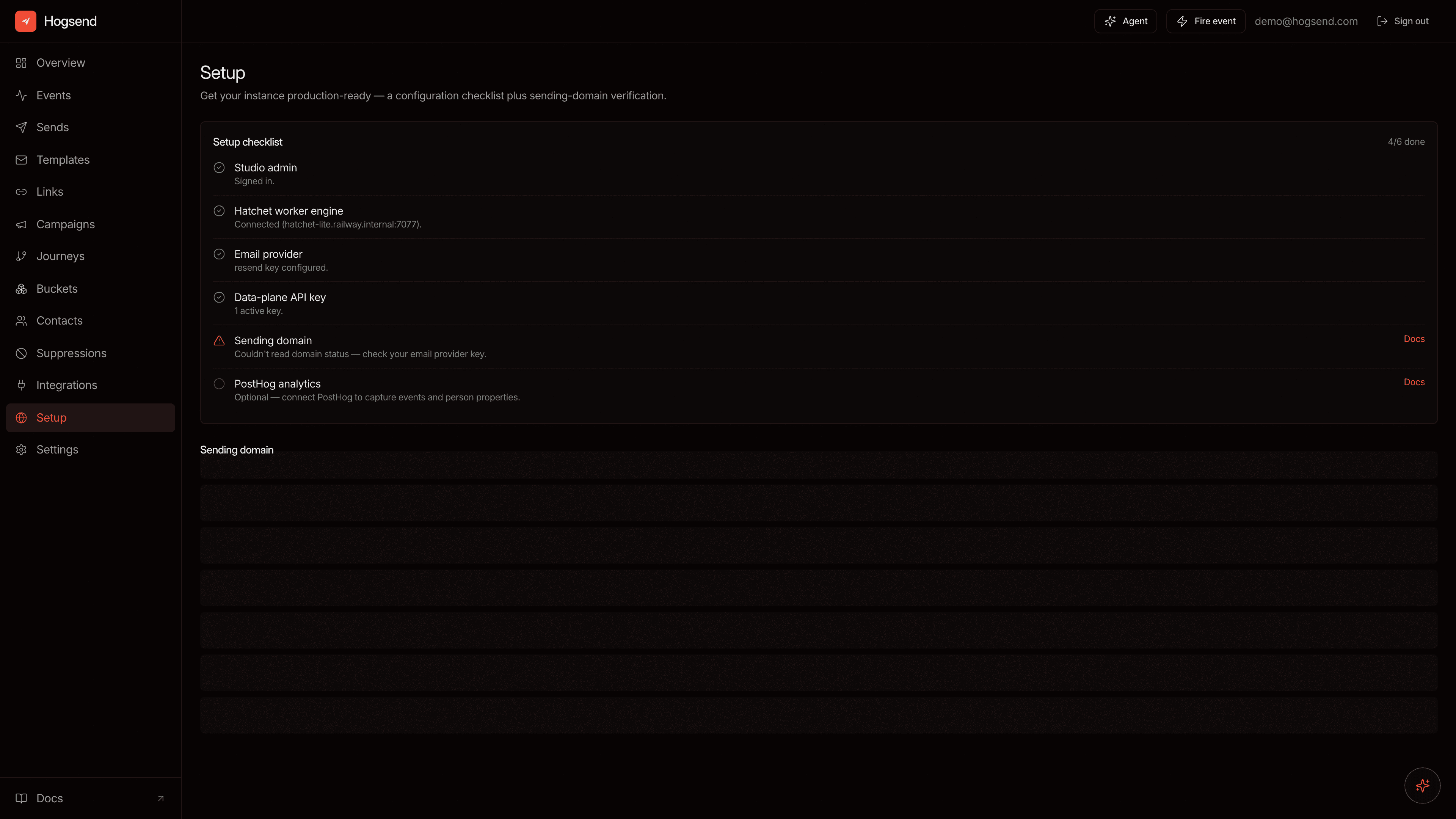
- /studio/setup — a checklist confirming the worker, email provider, API key, and sending domain are all wired up
Your welcome-1 send shows up under Sends; open it and you'll see open and click state populate once you interact with the email.
Link-click and open tracking is automatic — the engine rewrites outgoing HTML to inject tracked links and an open pixel before the provider ever sees it. There is nothing to configure; every send is tracked.
6. Did it work? (tiered success)
Required — the dependency-free aha (step 4). You fired test.signup twice and read two different event trails: the smoke-pro run emitted journey.pro_path, the smoke-free run emitted journey.free_path. That alone proves the engine end-to-end with no external accounts.
Optional adapters. Layer these in once the required path is green:
- Email — a
welcomesend visible in Studio → Sends. A provider key is enough to start (test mode redirects to your inbox until the domain verifies);hogsend domain checktakes it live (step 5). - Analytics — one PostHog event reaching Hogsend. Once deployed,
hogsend connect posthogwires it in one command; see the PostHog integration.
7. Author and upgrade
- Add a journey — create a file in
src/journeys/withdefineJourney, add its constants tosrc/journeys/constants/, and add it to thejourneysarray insrc/journeys/index.ts. That array is passed to bothcreateHogsendClient({ journeys })andcreateWorker({ container, journeys }). Full guide: Journeys. - Add an email template — drop a
.tsxcomponent insrc/emails/, register its key insrc/emails/registry.ts(with theTemplateRegistryMapaugmentation for type-safe props), and pass the registry ascreateHogsendClient({ email: { templates } }). Full guide: Email. - Call Hogsend from your own app code — the scaffold ships a preconfigured
@hogsend/clientatsrc/lib/hogsend.ts(hs), wired to yourHOGSEND_API_KEY. Usehs.events.send(...),hs.contacts.upsert(...),hs.emails.send(...)from a signup handler or billing webhook. Full guide: Client SDK. - Upgrade the engine — bump every
@hogsend/*package in lockstep, then apply any new migrations:
pnpm up "@hogsend/*"     # engine + db + core + email + plugins, one version line
pnpm db:migrate          # apply any new engine migrations, then your client track
# verify: GET /v1/health shows engine + client both inSync: true
This is never a git merge of a fork. See Upgrading & Customizing for the full upgrade flow and the Extend → Patch → Eject ladder — how to change engine behavior without losing clean upgrades.
Need a step-by-step breakdown with --json output for agents? hogsend setup is a lighter subset of pnpm bootstrap (compose up + .env + secret + migrate — no token/key minting, no port remap), and hogsend dev is the setup-and-run superset.
Contributing to the engine
The path above is for building an app on Hogsend. If you want to develop the engine itself (open a PR against @hogsend/engine, a plugin, or the scaffold), you clone the monorepo instead:
git clone https://github.com/dougwithseismic/hogsend.git
cd hogsend
pnpm bootstrap   # checks Docker, writes apps/api/.env, brings up infra, installs deps
The in-repo dogfood app lives at apps/api and exercises the engine directly. This is engine-development tooling — it is not the client install path. If you're shipping lifecycle journeys for your own product, scaffold an app (the steps above); don't clone the monorepo.
Next steps
Get a Hatchet token
Hogsend's one prerequisite. Local dev auto-mints it for you in bootstrap; for production, get a token from the self-hosted hatchet-lite dashboard, Hatchet Cloud, or your own instance and set three env vars.
Configuration
Reference for every Hogsend environment variable, the data-plane key, the two-track migration workflow, and the engine version pin.