Studio
The Hogsend Studio admin UI — observe sends, templates, journeys, contacts, and suppressions. Open it at /studio or run it locally with the CLI.
Hogsend Studio is a read-and-operate admin UI for your instance. It is a static single-page app that talks to the same /v1/admin/* API the CLI uses, so everything you can see in the Studio is also scriptable. It is built to observe, not author — journeys and templates stay code-first; the Studio shows you what is happening and gives you a few targeted actions (resend a failed email, enable/disable a journey, un-suppress a contact, send a test, manage API keys).
Live demo
You can click around a real Studio before you install anything. demo.hogsend.com is a stock Hogsend install seeded as Forgeline — a fictional AI code-review product with six months of contacts, sends, journeys, and campaigns. The shared sign-in is on its landing page; no email provider is configured, so nothing in it can send real mail.
Open the live demo →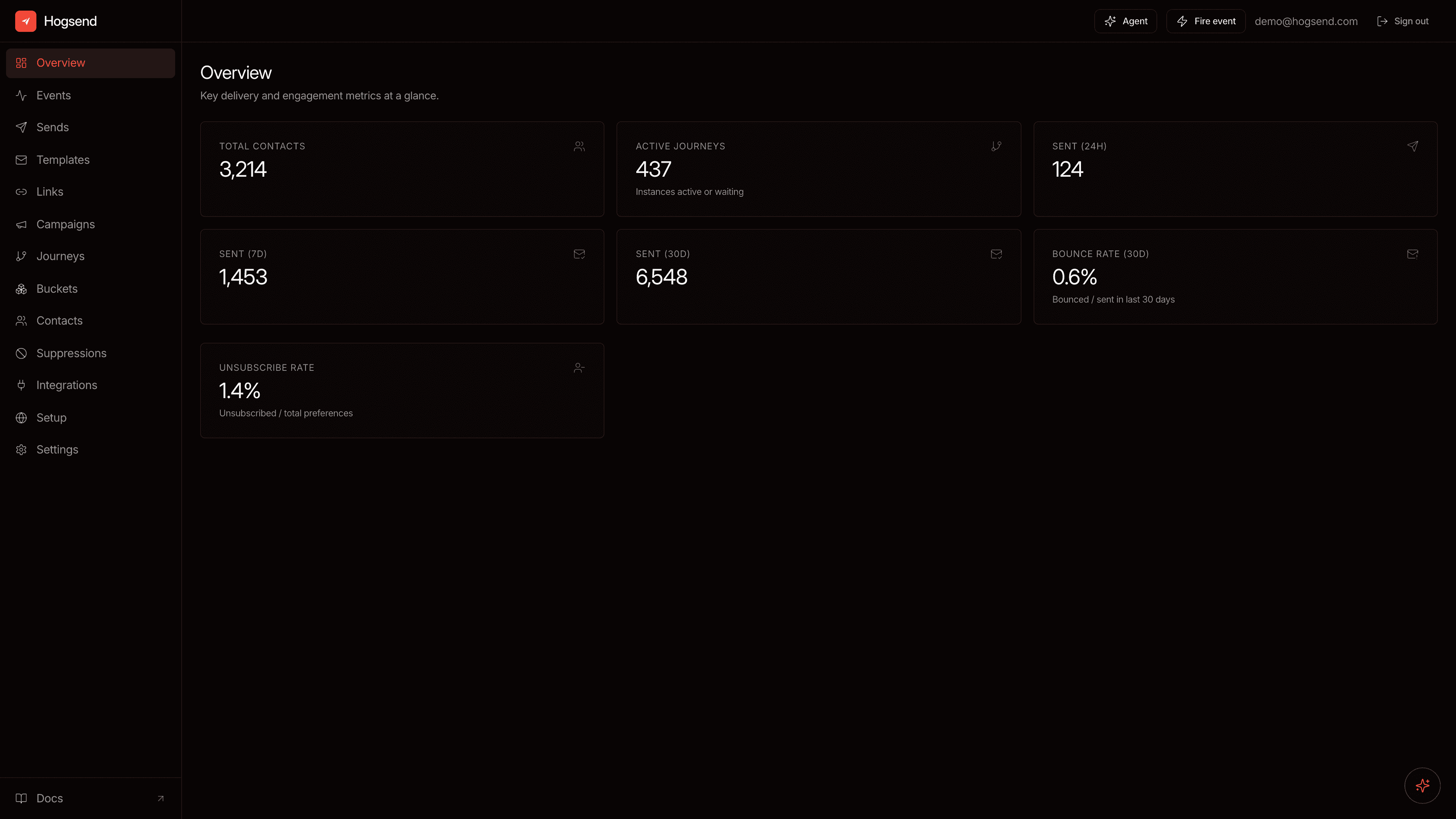
What's in it
| View | What it shows |
|---|---|
| Overview | Headline metrics for the instance (sends, delivery, engagement, contacts, journeys). |
| Events | Every event ingested into the pipeline — who it's from, its source, and its properties — filterable by event, source, user, and time range. |
| Sends | Every email send with filters (template, status, engagement, journey, recipient, date). Open a send for its event timeline + tracked links; resend failed/bounced sends. |
| Templates | The template catalog with a live preview (sandboxed iframe), per-template totals and a sends-over-time chart, and a send-test action. |
| Links | First-party tracked short links minted outside email — label, type (public/personal), live click count, and archive when done. |
| Campaigns | One-off broadcasts to a list or bucket — status, audience, scheduled time, and live send progress; cancel one still in flight. |
| Journeys | Enrollment + completion funnels per journey, with an enable/disable toggle. |
| Buckets | Real-time, code-defined audience membership — current size, enter/leave trends, and which journeys each bucket feeds. |
| Contacts | Search contacts; open one for its profile, activity, and timeline; un-suppress. |
| Suppressions | Bounced / unsubscribed / complained contacts, filterable, with un-suppress. |
| Integrations | Code-registered connectors and destinations — webhook URLs and verify secrets; connect via the CLI, then observe here. |
| Setup | A configuration checklist plus sending-domain verification, so you know when the instance is production-ready. |
| Settings | Create and revoke admin API keys (one-time secret reveal on create). |
Opening the Studio
There are two ways to get to it.
1. Mounted at /studio (recommended)
The engine serves the built Studio as static files at /studio on your API instance — same origin, so it uses your session cookie for auth and needs no extra configuration:
http://localhost:3002/studio       # local dev
https://api.example.com/studio     # production
This mount is best-effort: it only activates when a built Studio bundle is present. In the dogfood monorepo, build it once with:
pnpm --filter @hogsend/studio buildOn boot the engine logs Studio mounted at /studio (dist: …) when it finds the bundle. If no bundle is found the mount is skipped silently — the API never fails to start because the Studio is missing. You can point the engine at an explicit bundle with the STUDIO_DIST_PATH env var.
The static /studio files are public — that is intentional. The SPA itself decides what to show by probing GET /v1/auth/status and then requiring login. The actual data lives behind /v1/admin/*, which stays protected by the admin guard, so an unauthenticated visitor sees only the login screen.
2. Locally with the CLI
hogsend studio serves the Studio bundled with @hogsend/cli on a local port and (optionally) opens your browser. Use it to drive a remote instance from your machine:
hogsend studio --open                                  # serve on :3333, open browser
hogsend studio --base-url https://api.example.com --open
hogsend studio --port 4000| Option | Description |
|---|---|
--port <n> | Local port to serve on (default 3333). |
--base-url <url> | API instance the Studio should call (injected at runtime as window.__HOGSEND_STUDIO__). |
--open | Open the Studio in your default browser. |
--dist <path> | Override the Studio dist directory (advanced). |
Without --base-url the Studio calls the local server it is served from (static preview only — the API calls will fail). Set --base-url to your instance, or just open <instance>/studio directly. Because the SPA uses cookie auth, pointing a local Studio at a remote instance requires that instance to allow the Studio origin (CORS + cross-site cookies) — add the local origin to BETTER_AUTH_TRUSTED_ORIGINS (csv, beyond BETTER_AUTH_URL + API_PUBLIC_URL) on the instance. The simplest path for a hosted instance is the mounted /studio.
First load: create the first admin
Hogsend is single-tenant with closed sign-up — public sign-up is disabled at the auth layer (disableSignUp), so there is no unauthenticated network path that creates a user. POST /api/auth/sign-up/email returns 400 EMAIL_PASSWORD_SIGN_UP_DISABLED for everyone. The first admin is created from your server, by an operator who holds the deploy's credentials — the same posture as a self-hosted PostHog/GitLab/Supabase dashboard.
On first load the Studio probes GET /v1/auth/status. If no admin exists yet (needsSetup: true) it shows a read-only info screen (no form) telling you to create the first admin from the server, with a Reload button. Once an admin exists, every load shows the login form, and after a valid session the app shell loads. There is no create-admin form and no setup token — those are gone.
Create the first admin (two ways)
A. CLI (locally or on the host). Run the shell-gated hogsend studio admin create on a host that holds DATABASE_URL + BETTER_AUTH_SECRET. It talks directly to the database (no HTTP, no running API) and writes the password through Better Auth (scrypt) — never raw SQL, never plaintext at rest.
# locally — the scaffold ships an env-loaded wrapper
pnpm studio:admin                                       # = hogsend studio admin create, .env loaded

# anywhere the env is loaded
hogsend studio admin create --email admin@example.com   # bootstrap the first admin
hogsend studio admin reset  --email admin@example.com   # rotate a forgotten password
hogsend studio admin list                               # see who exists
DATABASE_URL and BETTER_AUTH_SECRET are read from the environment only (not a .env file). See Connecting the CLI below for how to load them locally and on Railway.
B. Env bootstrap (on deploy). Set STUDIO_ADMIN_EMAIL in your deploy env. On boot, if the user table is empty, the API mints that admin in-process:
- Set
STUDIO_ADMIN_PASSWORDtoo and it is used verbatim and never logged. - Omit it and the engine auto-generates a strong password and prints it once to the server log ("save this, shown once") — the single intended secret-logging exception. Rotate it immediately via the forgot/reset flow.
This is idempotent (only mints on a zero-user DB) and race-safe across replicas (the second loser is a no-op). Once an admin exists it never re-mints or re-prints.
Pick one. The CLI is the explicit path; env bootstrap is the zero-touch path for a fresh deploy. Both create the admin in-network — neither exposes a create endpoint over HTTP.
Connecting the CLI
The studio admin commands need DATABASE_URL + BETTER_AUTH_SECRET in the process environment — they are not read from a .env file. How you load them depends on where you run:
| Where | How to load env + run |
|---|---|
| Local (scaffold) | pnpm studio:admin — the scaffold's wrapper runs node --env-file=.env node_modules/.bin/hogsend studio admin create, the same way pnpm dev loads .env. |
| Local (manual) | dotenvx run -- hogsend studio admin create, or export $(grep -v '^#' .env | xargs) then hogsend studio admin create. |
| Railway | railway run hogsend studio admin create (injects the service env), or railway ssh into the service and run it there. |
| API ops (HTTP) | Unrelated to studio admin — the data/admin commands take --url <baseUrl> plus an --admin-key/--data-key. See the CLI. |
Forgot your password?
The login screen has a Forgot password? link. It emails a single-use, 15-minute reset link via your configured email provider; the link opens the Studio's reset card and revokes existing sessions on reset. The request always returns a neutral response (no account enumeration). If no email provider is configured, use the CLI reset path above instead.
Locked out: recover from a shell
When you can't get in at all — no admin yet, or a forgotten password with no email provider — the hogsend studio admin commands above are the guaranteed recovery path. They are gated only by holding DATABASE_URL + BETTER_AUTH_SECRET and shell access, so they work even when the web is unreachable.
Creating an API key
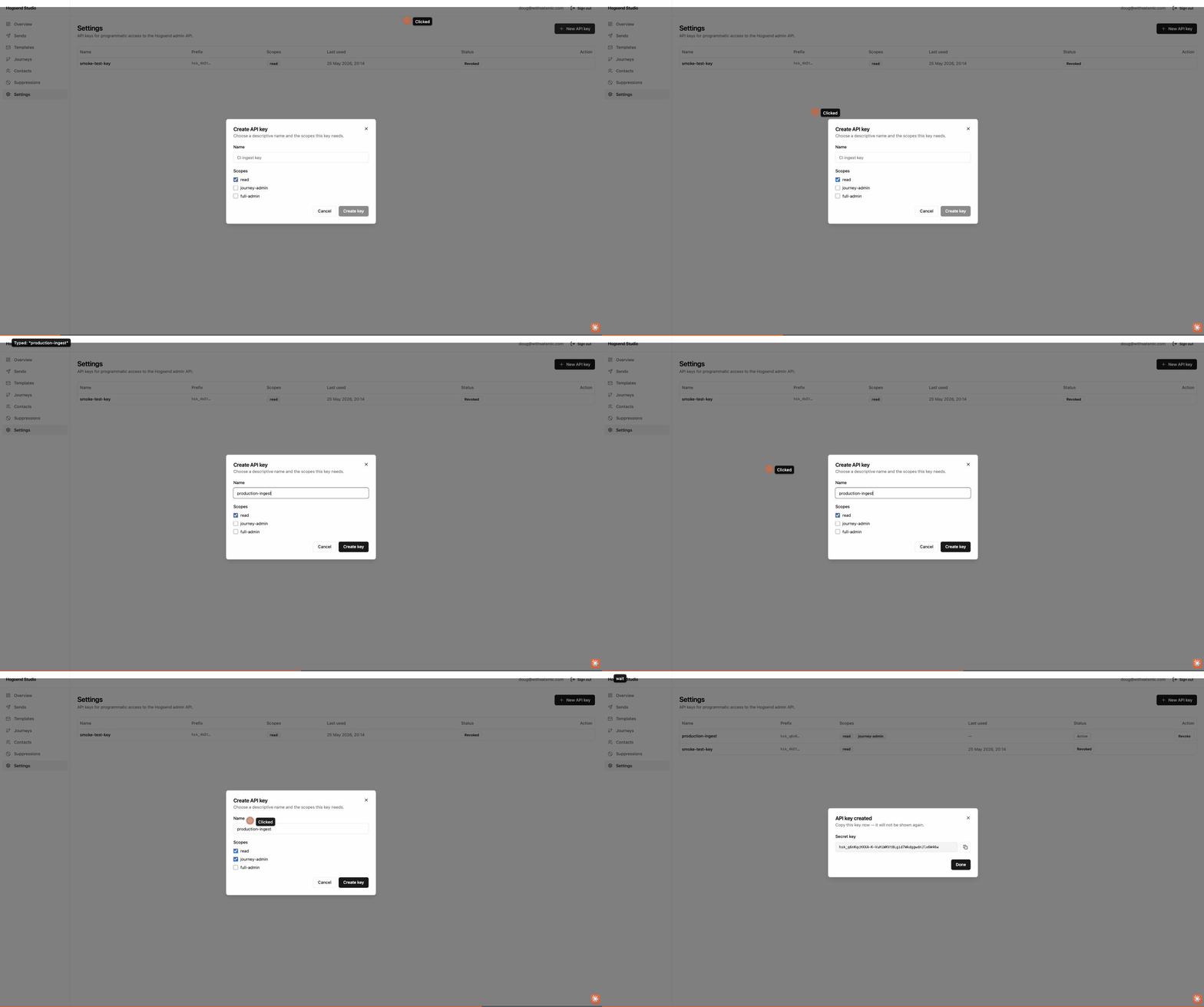
API keys authenticate programmatic access to /v1/admin/* — the CLI, CI jobs, agents, and anything that isn't a logged-in human in the Studio. Create them under Settings.
-
Open Settings in the sidebar and click New API key.
-
Give it a descriptive name (e.g.
production-ingest,ci,analytics-readonly) — this is how you'll recognise it in the list and the audit log. -
Pick the scopes it needs (least privilege wins):
Scope Grants readRead-only access to all admin endpoints (metrics, reporting, sends, contacts). journey-adminreadplus journey operations (enable/disable, retrigger).full-adminEverything, including destructive + billing-sensitive actions (e.g. send-test, key management). -
Click Create key. The secret is shown once — copy it immediately; it can't be retrieved again (only the prefix is stored). Pass it as
Authorization: Bearer <key>. -
To rotate or retire a key, Revoke it from the list — it stops working immediately. Revoking can't be undone, so create the replacement first.
# Use the key with the CLI or any HTTP client
export HOGSEND_ADMIN_KEY=hsk_...
hogsend doctor
curl -H "Authorization: Bearer $HOGSEND_ADMIN_KEY" https://api.example.com/v1/admin/metrics/overview
Relationship to the CLI
The Studio and the CLI are two front-ends over the same admin API. Reach for the Studio when you want to look — funnels, timelines, previews. Reach for the CLI (or its --json output) when you want to script — agents, CI, bulk operations. Neither authors journeys or templates; those stay in code.
Authentication
Two auth surfaces — the human Studio login (CLI/env first admin, sign-up disabled) and machine API keys (legacy or scoped database-backed).
Desktop app
Hogsend Desktop — a native macOS menubar companion that watches your instance's health, fires failure notifications, and opens the full Studio in a native window.