Bucket Operations
Run buckets in production — enable/disable, the reconcile cron, backfill and re-evaluation, observing membership in Studio, and the optional PostHog sync
Buckets are real-time, code-defined membership groups — power-users, trial-expiring-soon, went-dormant. A user joins the moment their data satisfies the bucket's criteria and leaves when it stops, and each transition fires a bucket:entered / bucket:left event through the same ingestion spine your journeys already use, so a membership change can directly trigger a journey. As an operator you don't author buckets (that stays code-first), but you do run them: toggle them on and off, keep the reconcile cron healthy, kick off backfills, and watch membership in Studio. This page covers all of that.
For the authoring model — defineBucket(), criteria, the alias helpers — see the Buckets guide. For the endpoint reference, see the API Reference.
Viewing All Buckets
List every registered bucket with its effective enabled state and live member counts:
curl -H "Authorization: Bearer your-api-key" \
  http://localhost:3002/v1/admin/buckets
{
"buckets": [
{
"id": "went-dormant",
"name": "Went dormant",
"enabled": true,
"kind": "dynamic",
"timeBased": true,
"entryLimit": "unlimited",
"counts": {
"active": 482,
"left": 1190
}
}
],
"total": 3,
"limit": 50,
"offset": 0
}counts.active is the current size — users in the bucket right now. counts.left is the historical total of departures (one row per leave; a re-entrant user contributes several over time). Filter by enabled state to see only live or paused buckets:
# Only enabled buckets
curl -H "Authorization: Bearer your-api-key" \
  "http://localhost:3002/v1/admin/buckets?enabled=true"

# Only disabled buckets
curl -H "Authorization: Bearer your-api-key" \
  "http://localhost:3002/v1/admin/buckets?enabled=false"
Understanding Bucket Metrics
The metrics endpoint adds size, throughput, and dwell:
curl -H "Authorization: Bearer your-api-key" \
  http://localhost:3002/v1/admin/metrics/buckets
{
"buckets": [
{
"bucketId": "power-users",
"name": "Power users",
"size": 214,
"entered": 530,
"left": 316,
"avgDwellSecs": 1814400
}
]
}| Metric | What it tells you |
|---|---|
size | Current active members |
entered | Total joins, ever (sums re-entries) |
left | Total leaves, ever |
avgDwellSecs | Average time a member stays in the bucket — now - enteredAt for active members, leftAt - enteredAt for those who have left |
For one bucket, the trend endpoint returns size plus an entered/left time-series you can chart:
curl -H "Authorization: Bearer your-api-key" \
  "http://localhost:3002/v1/admin/metrics/buckets/power-users?period=day"
The headline KPIs (GET /v1/admin/metrics/overview) also carry activeBuckets (how many buckets have at least one member) and bucketMembers (total active memberships across all buckets).
Reading the Numbers
- A growing
sizewith a flatleft— the bucket is filling but not draining. Expected for an inclusion bucket (power-users); for an absence bucket (went-dormant) it can mean members are not re-activating, which is exactly the audience your winback journey targets. enteredclimbing far faster thansize— heavy churn at the boundary. Members join and leave repeatedly. If a journey feeds off this bucket, lean onentryLimit(bucket side) andentryLimit(journey side) so you don't re-enroll the same users.avgDwellSecsnear zero — flapping. Usually a property bucket whose criteria sit right on a threshold. Consider aminDwelldebounce in the definition.
Enabling and Disabling Buckets
Toggle a bucket on or off at runtime without redeploying. The toggle is written to bucket_configs and overrides the enabled flag in code:
# Disable a bucket
curl -X PATCH http://localhost:3002/v1/admin/buckets/went-dormant \
  -H "Authorization: Bearer your-api-key" \
  -H "Content-Type: application/json" \
  -d '{ "enabled": false }'
{
"bucket": {
"id": "went-dormant",
"name": "Went dormant",
"enabled": false,
"updatedAt": "2026-06-03T10:30:00.000Z"
}
}# Re-enable it
curl -X PATCH http://localhost:3002/v1/admin/buckets/went-dormant \
-H "Authorization: Bearer your-api-key" \
-H "Content-Type: application/json" \
-d '{ "enabled": true }'Important behavior:
- Disabling stops evaluation — the bucket is skipped on the real-time ingest path and by the reconcile cron, so no new joins or leaves are computed.
- Existing members are not touched —
activerows stay active; Studio keeps showing the current size. No massbucket:leftis emitted on disable. - No transition events fire while disabled — any journey that triggers on this bucket simply stops receiving
bucket:entered/bucket:left. - The database override wins — even if the bucket's code sets
enabled: true, thebucket_configstoggle takes precedence and survives restarts and redeploys.
The PATCH override is hot — the engine consults an in-memory enabled map that is invalidated on this write, so the kill switch propagates within a short cache TTL (a few seconds), no restart needed. The ENABLED_BUCKETS env var is the cold equivalent: it is read at worker boot, so changing it requires a worker restart. Reach for PATCH to pause a misbehaving bucket immediately; use ENABLED_BUCKETS to set the load-time default.
Use the toggle to pause a bucket while you investigate flapping, hold a seasonal bucket until its campaign, or stop a bucket from feeding a journey during a maintenance window.
The Reconcile Cron
Real-time joins and leaves are computed inside ingest the moment an event arrives. But a time-based bucket can flip a user out with no inbound event at all — went-dormant enters a user precisely because they stopped firing events, and power-users drops a member when their rolling 30-day count decays below the threshold as the window slides forward. No event will ever signal those leaves, so an engine-owned cron sweeps for them.
The cron is bucketReconcileTask, registered automatically by createWorker — you don't wire it. Its cadence is the BUCKET_RECONCILE_CRON env var:
# Default — every 5 minutes
BUCKET_RECONCILE_CRON="*/5 * * * *"

# Tighter, e.g. every minute for faster absence-leave detection
BUCKET_RECONCILE_CRON="* * * * *"
Each tick, the cron:
- Selects only buckets flagged
timeBasedandkind: "dynamic". Pure-property buckets andmanualbuckets are skipped — a clock change can't affect them. - Runs a set-based should-leave query per bucket whose shape matches the criterion: for an absence bucket (
not_existswithin a window) a member leaves when the event reappears; for a count bucket (count gte Nwithin a window) a member leaves when the windowed count drops below the threshold. - Transitions the matching rows to
leftand emitsbucket:leftfor each — routed through ingest exactly like a real-time leave, so any journey withexitOn: [{ event: "bucket:left:<id>" }]exits in flight.
Because the cron computes leaves in bulk SQL, its cost scales with active membership, not your whole contact table. Absence-leave latency is bounded by the cadence — a member of a 5-minute bucket leaves up to 5 minutes after the clock crosses the window. That lag is real and Studio surfaces it honestly rather than hiding it (see Observing Buckets).
A missed or late cron tick only delays a leave — it never corrupts membership. The next tick catches up. Don't set BUCKET_RECONCILE_CRON so tight that a sweep can't finish before the next one is due on a large absence bucket; if you need sub-cadence leaves on a specific bucket, use fast-expiry timers instead.
Dwell Reactions and the Reconcile Cron
The same bucketReconcileTask sweep also drives dwell reactions — a bucket's bucket.on("dwell", { after } | { every }, …) handlers, which fire on how long a member has stayed in the bucket rather than on a join or leave. There is no separate dwell cron and nothing extra to wire; dwell rides the existing tick on the BUCKET_RECONCILE_CRON cadence.
What an operator should know about it:
- It runs over the existing population, off the clock. A dwell fire is computed by comparing each active member's continuous membership age against the reaction's
after/everyschedule — there is no inbound event. So, like absence leaves, dwell-fire latency is bounded by the cadence: a{ after: days(7) }reaction fires within one cron interval of the member crossing 7 days, not to-the-second. - It is continuous-membership-gated. Dwell measures uninterrupted time in the bucket. A leave (and any re-join) resets the clock — a re-join is a brand-new membership row that starts dwell from zero. A member who leaves at day 6 and re-joins never trips a 7-day
after. - It fires for the population that was already there, honestly. When a brand-new bucket id first deploys, its members are materialized by backfill (see Backfill and Re-Evaluation), and a backfilled member's
enteredAtis the deploy instant — so naively a 7-day dwell wouldn't fire until 7 days after deploy. To avoid that, backfill derives a historical anchor (dwellAnchorAt) per member where one is cheaply available (e.g. forwent-dormant, the timestamp they actually went dormant), and the dwell gate readscoalesce(dwellAnchorAt, enteredAt). The net effect operators see: dwell reactions fire for the pre-existing population shortly after deploy, dated from when each member really started dwelling, not from the deploy. Members who join after deploy leavedwellAnchorAtnull and dwell from their realenteredAt. - It is idempotent across sweeps. Each fire is recorded per membership (
dwell_state) and emitted through the same ingest path as enter/leave with a deterministic idempotency key, so a{ after }reaction fires once even across many sweeps, and an{ every }reaction coalesces to at most one fire per elapsed interval. A retried or overlapping sweep does not double-fire. - A dwell-only bucket is still swept. A bucket that has a dwell reaction but no rolling-window criteria is included in the sweep specifically for its dwell pass, even though it would otherwise be skipped as non-
timeBased.
Two schema columns back this (engine-track, added in migration 0013): dwell_state (per-membership record of which dwell schedules have fired) and dwell_anchor_at (the backfill-derived historical dwell start). Both are additive and nullable; your normal pre-deploy db:migrate applies them — see The Migration below. Dwell reactions themselves are authored in code (bucket.on("dwell", …)); like all generated reactions they are ENABLED_BUCKETS-gated and grouped under their bucket in Studio (see Observing Buckets).
Fast-Expiry Timers
For latency-critical absence buckets, a definition can set fastExpiry: true (the went-dormant example does). On join, the engine arms a per-user durable timer that fires the leave near the exact expiry deadline instead of waiting for the next cron sweep — so, say, winback eligibility flips within seconds of a user going quiet rather than within the cadence.
Fast-expiry is opt-in and the cron stays the authoritative backstop: if a worker restart loses a timer, the next sweep still catches the leave. The operational cost is that every active member of a fast-expiry bucket holds one live durable timer, so the live-timer count is the sum of active members across all fast-expiry buckets — treat it as a worker capacity-planning input and reserve fastExpiry for buckets with bounded membership. A large standing absence bucket with fastExpiry on can hold a lot of timers at once.
Backfill and Re-Evaluation
A bucket's membership has to be materialized — it lives in bucket_memberships, it is not recomputed on read. Two situations build or rebuild it.
First definition. When a brand-new bucket id appears, the engine runs a set-based backfill to materialize the members who already match — historical power users, already-dormant accounts. These backfilled members get an active row so Studio counts and journey-feed cross-references are correct, but first-time backfill does not emit live bucket:entered — historical matches must not blast a journey with a sudden flood of enrollments.
Criteria change. When you edit a bucket's criteria and redeploy, the engine detects the change (it persists a criteria fingerprint on bucket_configs and diffs it at boot) and runs a full re-evaluation: it joins newly-matching users and leaves members who no longer match. The emit semantics are deliberately asymmetric — re-evaluation leaves emit bucket:left (so in-flight journeys exit cleanly via exitOn), while re-evaluation joins do not emit (same rule as first-time backfill: an edit must not stampede live journeys).
Both run as chunked, idempotent, resumable Hatchet jobs — never inside a database migration. They are safe to re-run; the active-membership unique index makes a repeated insert a no-op.
Backfill and re-evaluation are tracked as job records, which is what drives the building / live badge in Studio. A bucket showing building is still materializing its members or catching up on a sweep — its size is not final yet. Wait for live before reading the count as ground truth.
Viewing Bucket Members
A membership is a single user's place in a bucket. List the current members of a bucket, with optional filters:
# Active members (the default)
curl -H "Authorization: Bearer your-api-key" \
  "http://localhost:3002/v1/admin/buckets/went-dormant/members"

# Historical leavers
curl -H "Authorization: Bearer your-api-key" \
  "http://localhost:3002/v1/admin/buckets/went-dormant/members?status=left"

# A specific user's membership rows in this bucket
curl -H "Authorization: Bearer your-api-key" \
  "http://localhost:3002/v1/admin/buckets/went-dormant/members?userId=user_abc123"
{
"members": [
{
"id": "550e8400-e29b-41d4-a716-446655440000",
"userId": "user_abc123",
"userEmail": "user@acme.com",
"bucketId": "went-dormant",
"status": "active",
"enteredAt": "2026-05-27T09:00:00.000Z",
"leftAt": null,
"expiresAt": null,
"lastEvaluatedAt": "2026-06-03T10:25:00.000Z",
"entryCount": 2,
"source": "reconcile",
"context": {},
"createdAt": "2026-05-27T09:00:00.000Z",
"updatedAt": "2026-06-03T10:25:00.000Z"
}
],
"total": 1,
"limit": 50,
"offset": 0
}| Field | What it tells you |
|---|---|
status | active (a current member) or left (a historical departure) |
enteredAt / leftAt | When this membership started and, if it ended, when |
entryCount | Which join this is for the user — 2 means they've entered this bucket twice |
source | How the membership was created — event (real-time ingest), reconcile (cron sweep), backfill (initial or re-eval build), or manual |
expiresAt | The armed deadline for time-based / fast-expiry buckets; null otherwise |
Buckets are re-entrant: a user can join, leave, and join again indefinitely. Each join writes a fresh active row and each leave flips it to left, so a single user can have one active row plus several left rows. entryCount lets you tell the re-entries apart.
Observing Buckets in Studio
The Buckets view in Studio is the operator's window into membership — and, like the rest of Studio, it is built to observe, not author. There is no visual bucket builder; definitions stay in code. What it shows:
- Current size per bucket, and a size-over-time chart.
- Entered / left as a funnel and trend, so you can see throughput and churn at a glance.
- Which journeys a bucket feeds — rendered as badges, grouped into two kinds. Owned reactions are journeys the bucket itself authored via
bucket.on("enter" | "leave" | "dwell", …); they desugar to durable journeys tagged with the bucket's id (sourceBucketId), so Studio groups them under their source bucket and marks them owned. External bindings are hand-written journeys bound to the bucket's transition events (bucket:entered:<id>/bucket:left:<id>or the generic forms) via the usual trigger cross-reference; they render plain. This is the fastest way to answer "if I disable this bucket, what stops firing?" — and to tell at a glance which of those flows the bucket owns versus which a teammate wired separately. - Enable / disable — the one mutation, behind a confirm dialog, hitting the same
PATCHendpoint above. - A building / live badge that surfaces backfill progress and cron-cadence lag honestly, so you know whether a size is settled or still catching up.
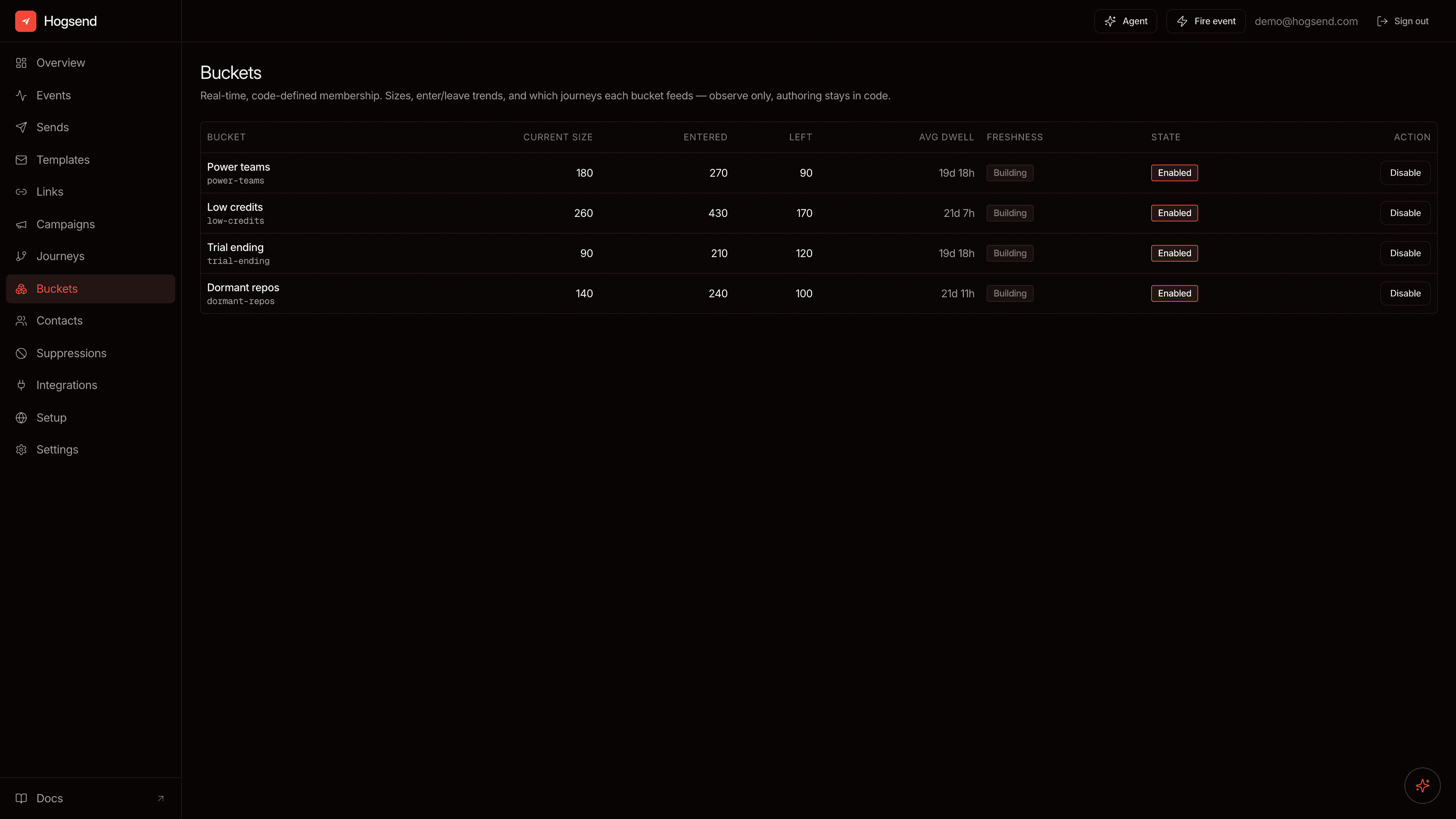
The bucket detail view also lists feedsJourneys and a sample of recent members, mirroring the API's GET /v1/admin/buckets/{id} response. In that response, owned reactions carry sourceBucketId === <bucket id> and owned: true; external bindings carry owned: false (and whatever sourceBucketId the journey itself declares, usually null). On a collision — a reaction that is also reachable via the alias cross-reference — the owned entry wins.
The Optional PostHog Sync
By default a bucket is internal — its transition events feed your journeys and nothing else. A definition can opt in to mirror membership back to PostHog with syncToPostHog: true. When set, on join the engine $sets a boolean person property (default hogsend_bucket_<id>) and on leave it $unsets it, via the existing PostHog capture path.
This gives a PostHog cohort built on hogsend_bucket_<id> a real-time-evaluable membership signal PostHog can't compute on its own. Two operational notes:
- The
$setis no faster than Hogsend's detection — sub-second for event-driven transitions, bounded by the reconcile cadence (or fast-expiry) for absence leaves. PostHog then evaluates the resulting person-property cohort in real time; the "real-time" part is PostHog's evaluation after the property lands, plus its own ingestion lag. - It is a no-op without
POSTHOG_API_KEY— the sync silently does nothing on self-host setups that omit PostHog. That's by design, not a failure.
This is the only external sync target the engine ships. Buckets are not a CDP destination surface — there is no built-in push to Braze, HubSpot, or Segment. To reach any other destination, trigger a journey on bucket:entered:<id> and have it call your own webhook or function, the same way a journey reaches any destination today.
The Migration
The bucket_memberships and bucket_configs tables are engine-track — they ship with @hogsend/engine and its bundled @hogsend/db, not in your own migrations/ directory. You don't generate or hand-write them.
On the release that introduces buckets, the engine migration (0011) is applied by your normal pre-deploy db:migrate step — on Railway that runs automatically before the new code goes live. Nothing extra is required: upgrade the engine, run migrations, done. The dwell-reaction release adds two more bucket_memberships columns in migration 0013 — dwell_state and dwell_anchor_at (see Dwell Reactions). Both are additive and nullable, so the same db:migrate step applies them with no downtime. See Upgrading for the two migration tracks and the expand → migrate → contract rules around engine schema changes.
Debugging Buckets
Why isn't a user in a bucket they should match?
# 1. Is the bucket enabled?
curl -H "Authorization: Bearer your-api-key" \
  http://localhost:3002/v1/admin/buckets/power-users
If enabled: false, the bucket isn't being evaluated at all.
# 2. Does the user have a membership row (active or left)?
curl -H "Authorization: Bearer your-api-key" \
  "http://localhost:3002/v1/admin/buckets/power-users/members?userId=user_abc123"
No active row means they don't currently match. A left row tells you they were a member and a leave was computed — check whether their criteria actually still hold.
# 3. Do the underlying events / properties exist?
curl -H "Authorization: Bearer your-api-key" \
  "http://localhost:3002/v1/admin/events?userId=user_abc123&event=app.active"
For an event/count bucket, confirm the events are in userEvents and inside the window. For a property bucket, remember criteria evaluate against merged contact state — check the contact's properties, not just the last event payload.
A time-based leave hasn't fired
Absence and count-decay leaves come from the cron, not from an event. If a member is stuck active past their window:
- Confirm the bucket is
timeBasedanddynamic— pure-property buckets are not swept. - Check the cron is firing — look for
bucketReconcileTaskruns in the Hatchet dashboard atlocalhost:8888. The cadence isBUCKET_RECONCILE_CRON(default every 5 minutes), so allow up to one full interval. - For latency-critical buckets,
fastExpiryshortens this to near the exact deadline.
A journey isn't triggering off a bucket
The bucket and the journey are wired through events, so trace both halves:
- Is the bucket actually transitioning? Check
entered/leftonGET /v1/admin/metrics/buckets. - Is the journey bound to the alias
bucket:entered:<id>(recommended) and is it enabled? See Journey Operations. - Was a transition event written? It lands in
userEventsasbucket:entered:<id>— query the events endpoint for the user.
For the full endpoint specification, see the API Reference.