Link tracking
First-party tracked links for any channel — mint personal or public links, vanity slugs, and re-targetable QR codes; count clicks and stitch identity outside the email pipeline.
Email already rewrites its links to redirect through your own domain and counts every click (see Tracking API). Link tracking is that same machinery as a standalone primitive: mint a first-party tracked link for any channel — a Discord message, an SMS, a QR code, a share link on your site — and get the clicks back as events, with optional per-person identity.
A tracked link is a short /v1/t/c/:id URL on your own API_PUBLIC_URL. It
302-redirects to the real destination and records the click first-party — no
third-party cookie, no external tracker, no deliverability hit.
Personal vs public
Every link is one of two types, and the type is a contract about identity:
public— shareable. A campaign-style link you can post anywhere. It counts clicks and attributes them to the link's campaign, but carries no person identity. Forward it and every click still rolls up to the same campaign — which is the point.personal— one recipient. It carries adistinctId(a canonical contact key) so a click can stitch the visitor's session to that person. Send it to one person; don't post it publicly.
The split exists because a shared link can't identify a person — whoever clicks
a forwarded "personal" link would be mis-attributed to the original recipient.
The engine enforces this: a public link never stores a distinctId, even
if you pass one.
Minting a link in code
mintLink is the channel-agnostic counterpart to email's send-time rewriter.
Call it anywhere you hold the container's db (a workflow task, a connector
action, a custom route):
import { mintLink } from "@hogsend/engine";

const { url } = await mintLink({
  db,
  url: "https://yourapp.com/welcome",
  baseUrl: env.API_PUBLIC_URL,
  source: "discord", // where it originated (open string)
  type: "personal",
  distinctId: contactKey, // honoured only for personal links
  label: "Discord welcome", // operator-facing name
  campaign: "discord-onboard", // grouping (mostly for public links)
});

// → url = https://api.yourapp.com/v1/t/c/<id>
// post `url` in the DM / channel / SMS / page
It inserts a durable links row (the named identity you manage) plus a
tracked_links click-counter row, and returns the short redirect URL. The
destination must be http(s) — non-http schemes are rejected at mint time, so a
managed link is never an open redirect.
In Studio
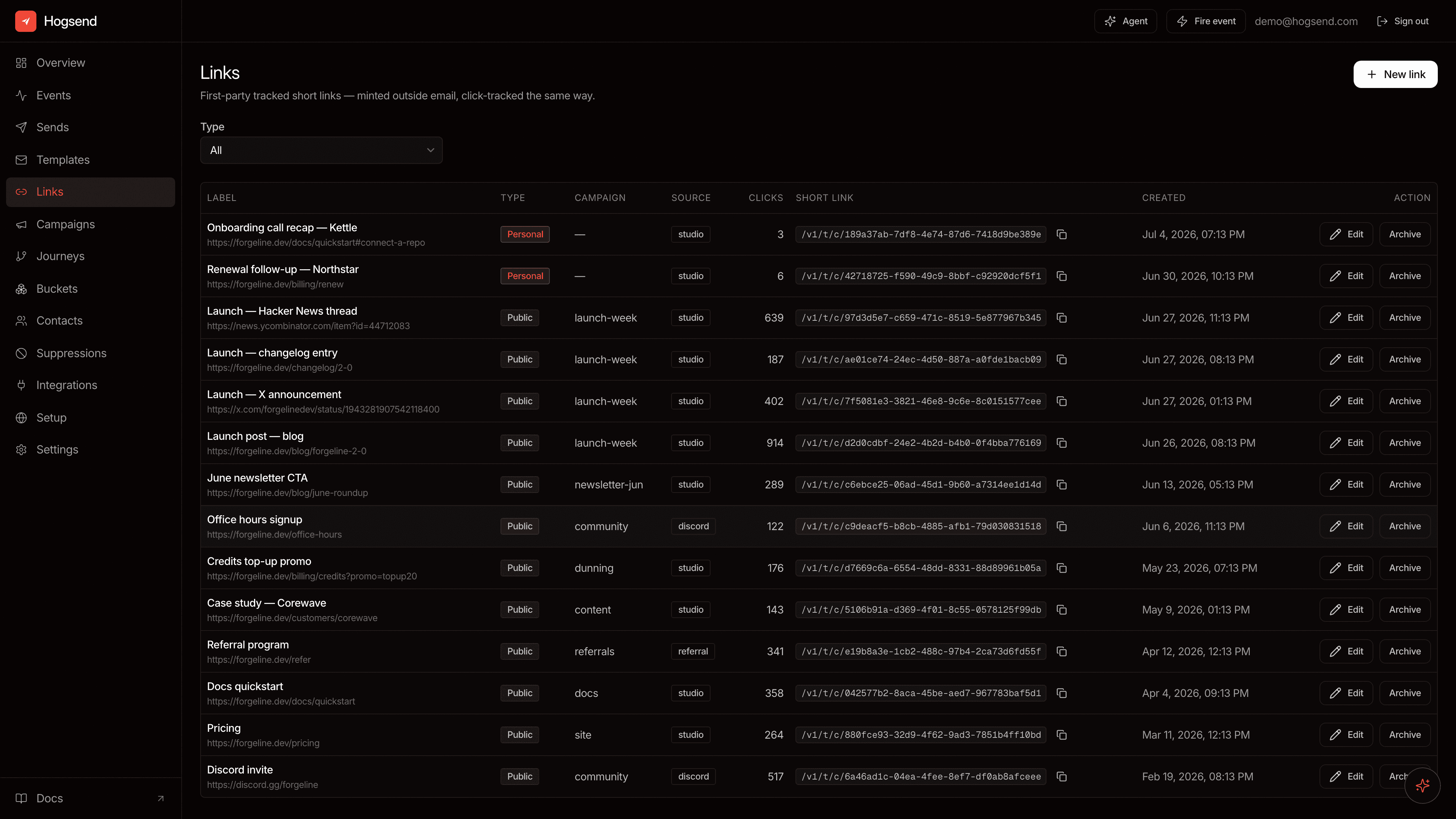
The Links view mints and manages links without code: pick a destination, name it, choose public or personal, and copy the short URL. The list shows each link's live click count and lets you archive the ones you're done with. Archiving is a soft-delete — the short URL keeps redirecting and the click history survives.
The same surface is a REST API: POST /v1/admin/links to mint,
GET /v1/admin/links to list, GET /v1/admin/links/:id for one link with its
recent clicks, PATCH to rename/regroup/re-target, DELETE to archive.
From @hogsend/client, the same calls are the hs.links resource:
const link = await hs.links.create({
  url: "https://example.com/launch",
  slug: "spring-mailer", // idempotent: re-running returns the same link
});
// link.id, link.vanityUrl (/l/spring-mailer), link.existing

await hs.links.update(link.id, {
  originalUrl: "https://example.com/spring-offer-v2", // re-point a printed QR
});
const png = await hs.links.qr(link.id, { format: "png", size: 1024 }); // Uint8Array
create is idempotent: re-minting a slug with the same destination and type
returns the existing link (existing: true) instead of a 409. For a slugless
link (a standalone QR, say), pass an idempotencyKey and re-runs dedupe the
same way. get, list, update, and archive round out the resource.
Vanity slugs
A managed link can carry a memorable slug layered over the UUID short URL:
https://api.yourapp.com/l/black-friday- Shape: 1–64 characters of
a-z,0-9,-— no leading or trailing hyphen. Input is lowercased before validation, so/l/Black-Fridayresolves the same link. - Unique per instance. Minting or PATCHing a taken slug is a
409, with one exception: a re-mint that repeats a live link's destination and type returns that link (existing: true) instead. - Same click, same stats.
/l/:slugresolves the link's canonical tracked row and runs the exact click pipeline/v1/t/c/:idruns — one counter, onelink_clickshistory, whichever URL was hit. - Lifecycle. Set a slug at mint (
slugonmintLinkorPOST /v1/admin/links), replace it viaPATCH, or clear it withslug: null— clearing frees the slug for reuse and stops the vanity path resolving (the UUID short URL keeps working). Archived links keep their slug reserved and keep redirecting.
QR codes
Every managed link can render a QR code:
GET /v1/admin/links/:id/qr?format=svg|png&size=64..2048&transparent=true|falseFrom the client, hs.links.qr(id, { format: "png" }) fetches the same code as
bytes (a Uint8Array), and hs.links.qrUrl(id, { format: "svg" }) builds the
URL without fetching it.
The code encodes the link's durable scan URL — never the vanity slug — so a
printed code keeps working through slug changes and destination re-targets.
Scans are recorded on a dedicated per-link scan row, which means link responses
carry both clickCount (all entry paths) and scanCount (QR scans only).
The Studio QR codes view is the print-first lens over the same links:
- New QR code mints a link from just a destination, a label, and a description (what/where the printed code physically is — how you tell codes apart in bulk).
- The QR dialog previews the code and downloads it as PNG, PNG with a transparent background (for placing on your own artwork), or SVG.
- Re-target in place. Change the destination and every already-printed copy redirects to the new target on its next scan.
Stats per destination
Every click and scan records the destination that was live when it landed. When
you re-target a link, GET /v1/admin/links/:id returns a destinations array
— one bucket per destination, each with its own clicks, scans, and
first/last hit times — and the Studio QR dialog shows the same breakdown. The
QR code on your door can point at this month's offer while last month's numbers
stay attributed to last month's page.
Arrival attribution — "did a known user scan this?"
A redirect can't recognize the visitor: your app's cookies live on your site's domain, not the tracking host. Arrival attribution closes that gap with one extra hop — the landing page reports the visitor back.
- Opt in per link (
appendRefon mint/PATCH; the Studio toggle — default ON in the New QR code dialog). The redirect then appendshs_ref=<hit id>to the destination. Leave it off for destinations that reject unknown params (e.g. OAuth redirect URIs). Reserved params on tracked destinations:hs_t,hs_ref. - The landing page reports back to
POST /v1/t/arrivewith{ ref, anonymousId? | userToken? }. With@hogsend/jsthis is automatic: the SDK readshs_refon init, sends the beacon with the session's identity, and strips the param (captureRef: false+hogsend.captureRef()for SPAs that route before init). - Identity is evidence-based, same rules as everywhere: a
userToken(server-minted viagenerateUserToken) proves a userId — that's a known contact arrival. A bare anon id is provenance-only: it can never attach to an identified contact, and one that collides with an identified contact's key is discarded. The endpoint answers200 {"ok":true}to every outcome. - What you get: the hit row is stamped with the visitor
(first-write-wins — replays can't re-attribute), link detail carries
arrivalCount+identifiedArrivalCount, the Studio QR dialog shows "N confirmed arrivals · M from known contacts", and alink.arrivedevent fires on the bus (trigger journeys on it; filter bylinkId,campaign, orsource: "qr") and on outbound webhooks. link.arrived⊆link.clicked: it only fires when the link opts in AND the landing page integrates — never trigger a journey onarrivedexpecting every click.
Server-rendered site without @hogsend/js? Read hs_ref from the request URL
and POST it yourself — with a userToken minted server-side when the viewer is
logged in:
import { generateUserToken } from "@hogsend/engine";

await fetch(`${HOGSEND_URL}/v1/t/arrive`, {
  method: "POST",
  headers: { "Content-Type": "application/json" },
  body: JSON.stringify({
    ref: url.searchParams.get("hs_ref"),
    userToken: generateUserToken({
      userId: session.userId,
      secret: process.env.BETTER_AUTH_SECRET,
    }),
  }),
});
Click counts
The count is computed on read by summing tracked_links.click_count, so a click
never writes back to the links row. Each click also records a link_clicks
row (IP, user agent, timestamp), which the Studio link detail shows newest-first.
Identity, the share-safe way
A personal link can stitch a click to a person across devices. With
TRACKING_IDENTITY_TOKEN=true, the redirect appends a short-lived, encrypted
hs_t token; your landing site exchanges it for the distinct id and identifies
the session:
// on the landing site, after arrival from a tracked link
const res = await fetch("https://api.yourapp.com/v1/t/identify", {
  method: "POST",
  headers: { "Content-Type": "application/json" },
  body: JSON.stringify({
    token: params.get("hs_t"),
    currentDistinctId: posthog.get_distinct_id(), // optional: fold this session in
  }),
});
const { distinctId } = await res.json();
posthog.identify(distinctId); // the link click and the web session merge
The exchange is single-use: the first exchange of a token wins, and a replayed or reshared token is a 200 no-op. A forwarded personal link can therefore stitch at most once — it can't keep folding new sessions into the original person. (See Semantic links → cross-device identity for the token's AES-256-GCM encryption and the anti-hijack model.)
A public link has no token and no distinctId — there's nothing to
identify, by design. You still get the click and its campaign.
How it relates to email
Email links and managed links share one click spine (tracked_links +
link_clicks) but stay independent:
- Email rewrites HTML at send time and leaves
tracked_links.link_idNULL — its links belong to anemail_sendsrow, not a managedlinksrow. mintLinkcreates a managedlinksrow and pointstracked_links.link_idat it.
So the Studio Links view lists only your managed links, not the per-send links inside every email. Both emit the same first-party click event.
What it is not
- Not a public-link person tracker. A shared/public link attributes by campaign only — it can't tell you who clicked, because you can't put one person's identity on a link many people share.
- Not a URL shortener for untrusted input. Destinations are validated
http(s)and links are operator-minted (Studio or your own code); the redirect follows the stored URL, so it isn't an open redirect for arbitrary callers.
See also: Tracking API for the click/open endpoints and schema, and Semantic links for links whose clicks carry an answer.
Semantic links
In-email surveys and one-tap actions — links whose clicks fire real events, with EmailAction.
Lists
Code-defined email subscription categories — declare a list with defineList(), pick its opt-in vs opt-out polarity, and the engine wires suppression, the preference center, and the runtime API automatically.